Open source · Self-hosted · No telemetry
The control plane for
Python task queues.
One dashboard for Celery, RQ, Dramatiq, Huey, arq and taskiq. Persistent history, capability-aware controls, a live scheduler and a signed audit log, installed into the application you already run.
The demo opens with sample projects, no account. Read the docs
Your stack, as it is
Framework, workers, schedulers. One agent per layer, nothing rewritten.
Framework
Where your application runs






Schedulers
Yours, surfaced as they are, or ours






- 6
- engines, one dashboard
- 3
- frameworks, one line to install
- 791,441
- tasks completed in the 24-hour release soak
- 1,000
- schedules firing through it, audit chain verified
Get running
Run it where your work runs.
From a single box to a replicated production install. Every path runs the same dashboard, the same engines and the same audit surface. Replicas, partitioned history and full-text search need PostgreSQL.
pip install z4j
z4j serveStarts on :7700 with bundled SQLite and prints a setup URL. Python 3.11 or newer. Install guide
git clone https://github.com/z4jdev/z4j.git && cd z4j
docker compose up -dOne compose file, SQLite bundled in the multi-arch image (amd64 and arm64). Tail the logs for the setup URL. Install guide
git clone https://github.com/z4jdev/z4j.git && cd z4j
docker compose -f docker-compose.postgres.yml up -dAdds PostgreSQL 17+ for replicas, partitioned history and full-text search. Write the .env with its secrets first; the guide has the exact block. Install guide
Pip (SQLite)
Install from PyPI, then start with z4j serve. Runs as a single Python process with a local SQLite file.
Docker (SQLite)
Single docker compose file. SQLite bundled, auto-mints secrets and the scheduler's mTLS certificates on first boot, auto-runs migrations, starts the scheduler. One command from clone to dashboard.
Docker (Postgres)
Four services: the z4j image, a Postgres sidecar, two scheduler replicas and a certificate one-shot. Central backups via pg_dump, range partitioning on events, horizontal brain replicas behind a load balancer.
Then one line inside your app.
Compare all three pathsThe agent is a pip package that runs inside the application you already have. It connects outbound to the brain, so nothing needs to reach into your workers.

Django
Django AppConfig integration, zero boilerplate.
pip install z4j-django[celery]

Flask
Flask extension pattern. One line to install.
pip install z4j-flask[celery]

FastAPI
Lifespan-hook integration for async stacks.
pip install z4j-fastapi[arq]
Plain Python
No web framework? One call at process boot.
pip install z4j-bare z4j-celery
From signal to action
The alert is not the answer.
A notification says something broke. It does not say which argument, which worker, how many times, or whether it is still happening. z4j keeps the history, the schedule and the controls in one place.
See what needs attention
Persistent history, failure fingerprinting that groups one bug across its runs, and a live activity feed.
How failures are groupedKeep scheduled work on track
Database-backed schedules you edit without a redeploy, explicit catch-up policies, and misfire detection when a fire never happens.
The schedulerAct with governed controls
Retry, cancel and bulk-retry only where the engine can, automation with a breaker and a kill switch, every action on a signed log.
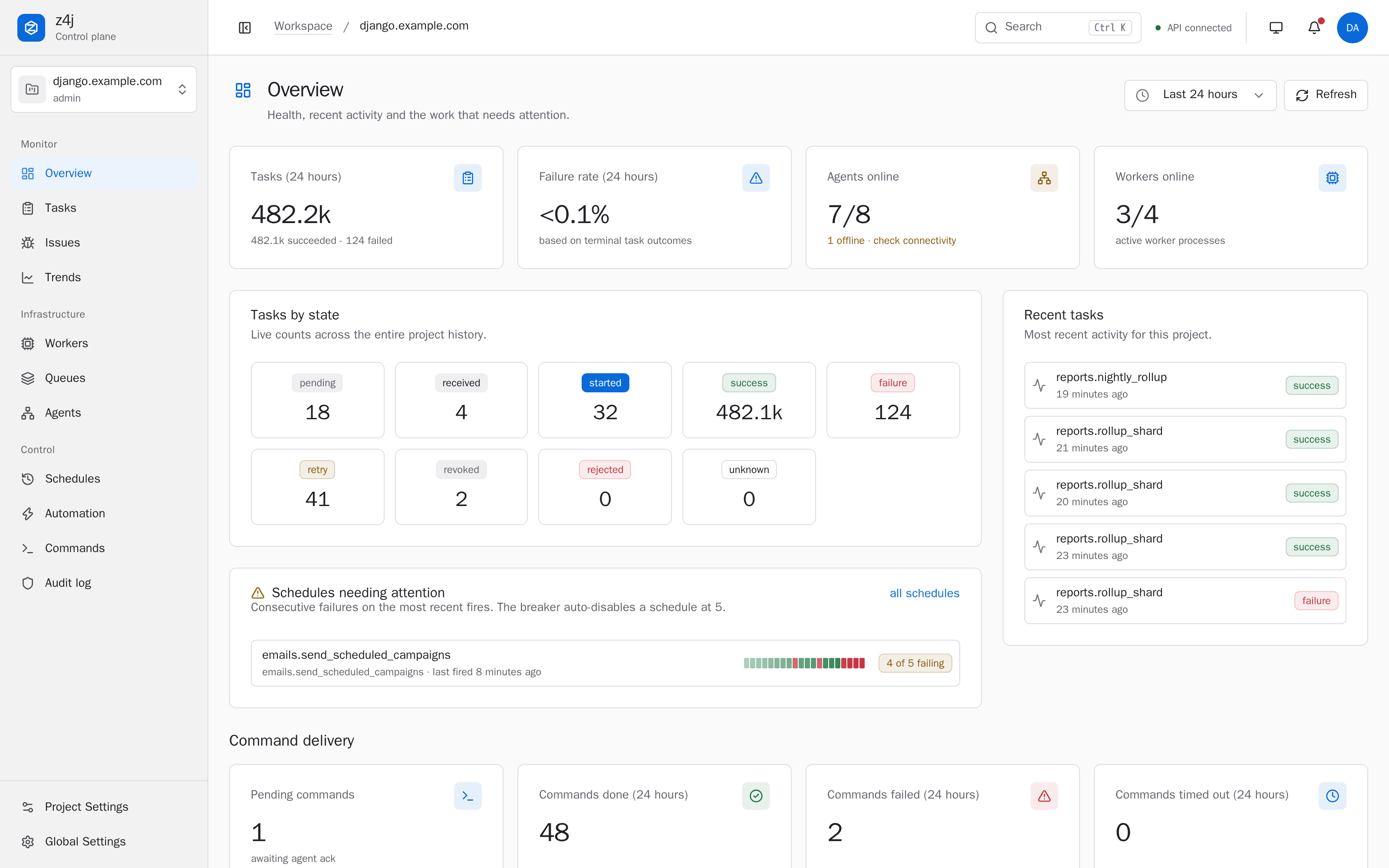
The rule engineOverview
Health at a glance.
- Outcomes, failure rate, and agents and workers online for the window you choose.
- Schedules needing attention surface before the breaker disables them.
- Command delivery shows what is pending, done, failed and timed out.
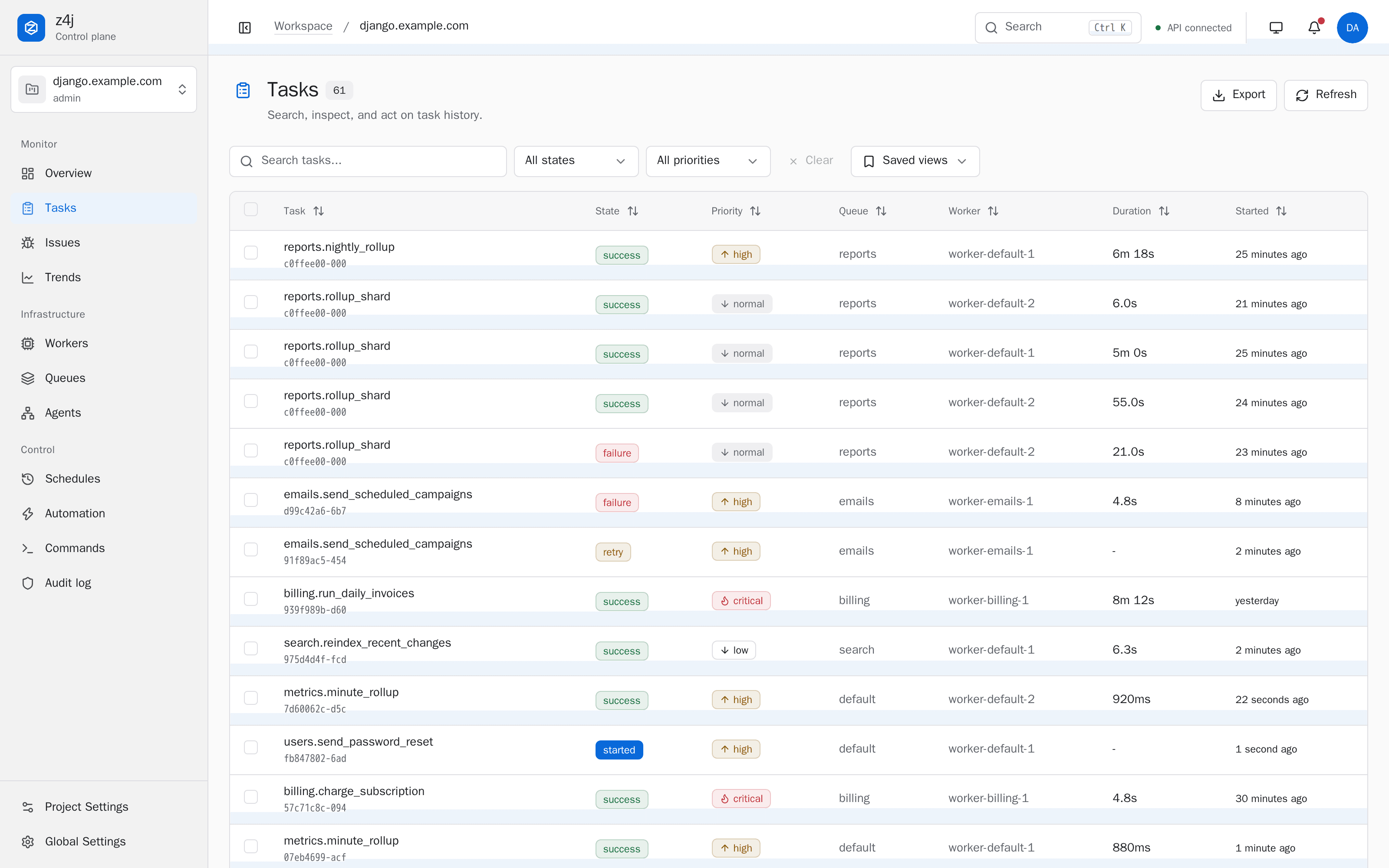
Tasks
History that survives a restart.
- Search, filters and saved views over the full task history, not only what the broker still remembers.
- Recognized secrets in arguments are redacted at the agent, before they leave your process.
- Retry, cancel and bulk-retry run only where the adapter advertises them, and each action lands on the audit log.
z4j-scheduler
One scheduler for every engine, built to be run in production.
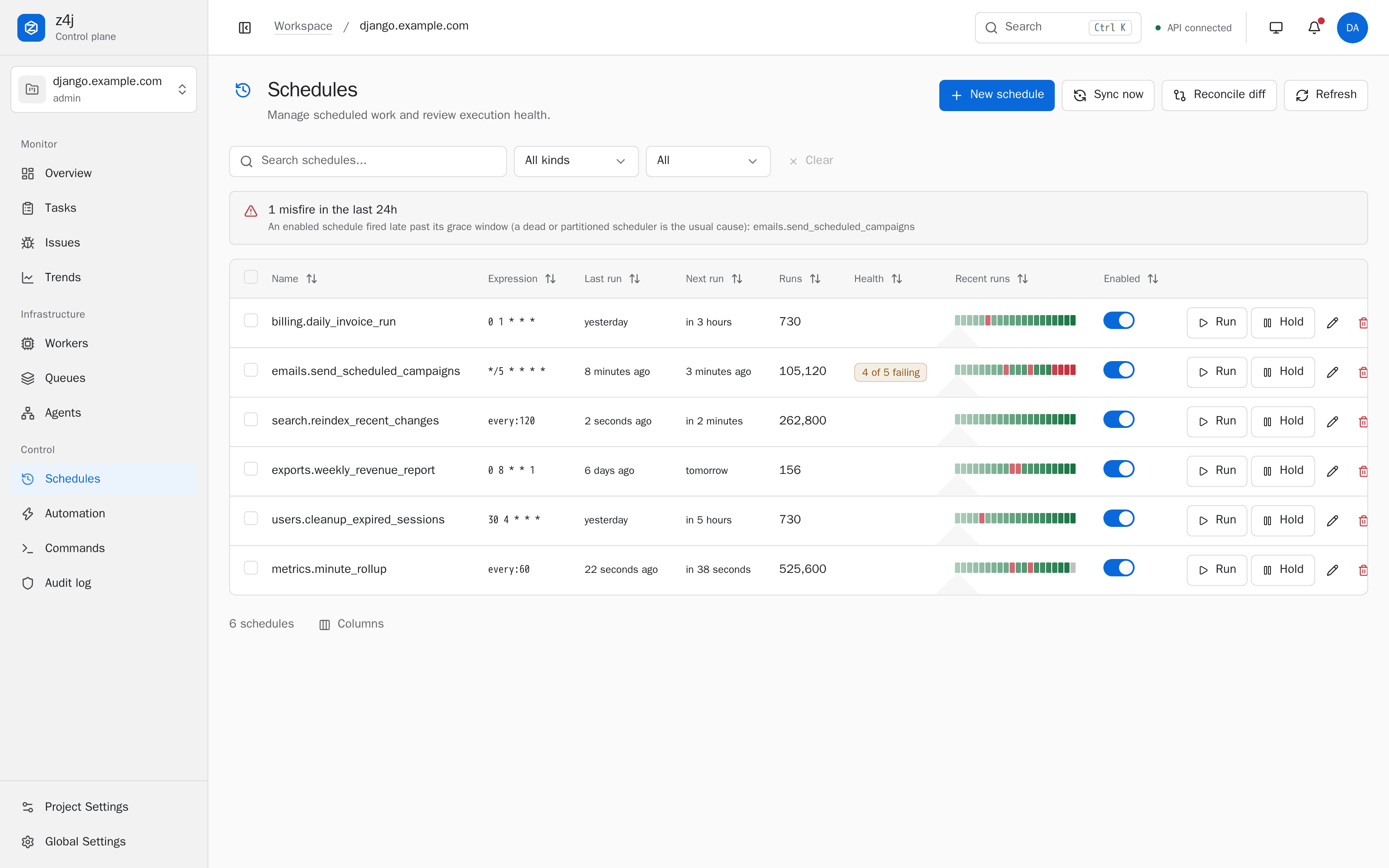
celery-beat schedules one engine from one process, and its default schedule lives in code you redeploy. z4j-scheduler keeps schedules in the database, drives all six engines, elects a leader on PostgreSQL, applies an explicit catch-up policy after an outage, and tells you when a fire slipped.
-
Edit live
Create, edit, hold and run from the dashboard or REST, or declare schedules in app config. No daemon restart.
-
Catch-up policy per schedule
After an outage each schedule decides for itself: skip what it missed, fire one, or fire every slot it owes.
-
Leader election
Instances race for a Postgres advisory lock. Only the leader ticks; followers stay warm and one takes over once the database notices the leader is gone.
-
Misfire detection
The brain flags an enabled schedule that slipped past its grace window: the failure with no event to show.
| Capability | celery-beat | z4j-scheduler |
|---|---|---|
| Engines | Celery only | All six: Celery, RQ, Dramatiq, Huey, arq, taskiq |
| Edit without a daemon restart | No | Dashboard, declarative config, REST |
| Fire history per schedule | No | Buffered, acked, listed per schedule |
| Audit log of schedule edits | No | HMAC-chained |
| Fire now | No | Dashboard and REST |
| HA / leader election | Single instance only | Postgres advisory-lock leader, rolling-restart safe |
| Catch-up after an outage | All-or-nothing | Per schedule: skip, fire one missed, or fire all missed |
Import from celery-beat, django-celery-beat, rq-scheduler, APScheduler, cron, Huey, arq or taskiq with one command, verify the diff in the dashboard, then switch the old one off. Or run both during a migration window with the coexistence adapter. Full comparison, including where celery-beat is still the right choice
Architecture
Agents in your app. One control plane. One channel.
Each layer of your stack gets a pip package that runs inside your process: it redacts at capture, buffers locally, and opens one outbound HMAC-signed WebSocket. Events go out, commands come back, and nothing has to reach into your workers.
- Frameworkz4j-django · z4j-flask · z4j-fastapi · z4j-bare
- Workersz4j-celery · z4j-rq · z4j-dramatiq · z4j-huey · z4j-arq · z4j-taskiq
- Schedulerz4j-celerybeat · z4j-rqscheduler · z4j-apscheduler · z4j-hueyperiodic · z4j-arqcron · z4j-taskiqscheduler
- BrainAPI · dashboard · rule engine · reconciliation
- Schedulerz4j-scheduler, leader elected on PostgreSQL
- DatabasePostgreSQL or SQLite: history, schedules, audit chain
One protocol. Capability-aware controls.
Six engines do not have six identical feature sets. Pretending otherwise is how a dashboard offers you a button that silently does nothing.
Every engine adapter implements one universal primitive,
submit_task(name, args, kwargs),
that every task queue can satisfy. Beyond that, each adapter advertises
the operations its engine can genuinely perform, and only those operations
run. The brain stores observed task arguments redacted, so it never
pretends that copy can safely drive a retry.
- Retry and bulk-retry gated by the loaded adapter's capability contract
- Cancel runs only where the adapter advertises it; some engines stop only pending work
- DLQ requeue engine-specific; Celery's generic adapter does not advertise it
- Restart worker native on Celery; not offered where the engine has no remote restart
- Rate limit Celery only, because it is a Celery worker remote-control command
# The one method every engine implements
async def submit_task(
    self,
    name: str,
    *,
    args: tuple = (),
    kwargs: dict | None = None,
    queue: str | None = None,
    eta: float | None = None,
    priority: int | None = None,
) -> CommandResult:
    ...
Automation
Rules that act on failures, with the brakes built in.
A per-project rule matches a task or scheduler trigger and runs a governed action: notify an operator, retry a task, or cancel a task. The guardrails are the point, so they ship with every rule.
Circuit breaker
A rolling window trips a runaway rule into notify-only before it can amplify the incident it was meant to contain.
Kill switch
One per-project switch halts all automation at once, without deleting the rules you spent time tuning.
Dry-run mode
Record exactly what a rule would have done, against real traffic, without touching anything. A new rule proves itself first.
Fingerprint targeting
A rule can condition on one issue fingerprint, so it fires for a single failure signature instead of every error.
Creating, editing, re-arming, or re-enabling a destructive rule requires admin authority, and an MFA-enrolled user making that change from a browser session must have verified MFA recently. Before a rule retries or cancels a task, the runner rechecks that its creator still holds project-admin membership, and every firing lands on the audit log. See the rule engine
Security posture
Controls we implemented, and boundaries we wrote down.
A control plane is worth what its weakest documented boundary is worth, so we publish both. One limitation is open by choice, not by oversight: a role that can write z4j's database tables can defeat both in-database boundaries.
HMAC-chained audit log
Per-row HMAC plus a prev_row_hmac chain, signed with a key held apart from the application secret, with the head and row count authenticated separately. Catches edits and deletions that bypass the audit service through an application bug, a downgraded adapter or an operator mistake. Against a role that can write the database itself, export the head off-box and verify against it.
Argon2id password hashing
64 MiB memory, 3 iterations. Passwords shorter than 16 characters require 3-of-4 character classes, and every password is checked against the denylist.
RBAC and opt-in MFA
Four project-scoped roles, TOTP MFA with single-use recovery codes and trusted devices, and a fresh-MFA gate in front of sensitive routes. All of it in the open-source build.
Defense-in-depth rate limits
Per-worker IP buckets on login (20/min), invitation preview plus accept (30/min shared), and password-reset request plus confirm (10/min shared). Multi-worker fleets need a reverse-proxy limit for one shared ceiling.
Redaction pipeline
A rule-based recursive scrubber at the agent, with a defense-in-depth re-scrub on the brain. Built-in patterns cover recognized secrets and PII, and you add application-specific patterns.
SSRF-hardened outbound
Private and special-use destinations are blocked for webhooks, channel URLs, and SMTP. HTTP targets use scheme allow-lists and DNS-pinned dialing; SMTP is re-resolved before send.
What we do not claim. z4j publishes its threat model and known limitations, including the ones we have not fixed yet. It is not certified for any compliance framework, and the controls are designed to be mappable to an audit rather than to stand in for one. Read the boundaries before you run production workloads on it.
In the free release
No commercial tier holds the useful half.
Twelve of the 32 capabilities that ship in the open-source build. The commercial license exists only for organizations whose policies exclude AGPL, and it is the same software.
- Capability-aware action surface
One protocol. Honest engine-specific controls.
- Issues: failure fingerprinting
The same bug across every run collapses into one issue.
- Durable bulk retry
Retry a thousand failures once, and only once.
- Automation rule engine
Match a trigger. Run a governed action. Every firing on the audit chain.
- Dynamic scheduler
Edit schedules from the dashboard. Drives every engine.
- Scheduler reliability
Know when a schedule should have fired and did not.
- HMAC-chained audit log
Privileged actions, signed and chained.
- RBAC built-in
Four roles. Project routes gated. UI mirrors server.
- MFA with TOTP, recovery codes, and trusted devices
RFC 6238 TOTP, single-use recovery codes, per-device 30-day trust cookie. WebAuthn deferred; no SMS or email second factors.
- Secure-by-default redaction
Built-in and configurable patterns scrub recognized secrets from task arguments before transport.
- Notification providers
Seven native channels. Plug into the stack you already use.
- Stuck-task reconciliation
Tasks started forever. Fixed, automatically.
Comparison
Honest about what you already run.
Flower covers Celery and RQ Dashboard covers RQ. Each comparison says where the other tool is the better choice, because sometimes it is.
Flower
The classic Celery viewer.
Full comparisonRQ Dashboard
The simple web view for RQ.
Full comparisonGrafana + Prometheus
The DIY metrics approach. Great for SRE, wrong tool for task ops.
Full comparisonQuestions
Before you install it.
Do I have to rewrite my tasks?
No. z4j observes and governs the queues you already run. You install a small Apache-2.0 agent package into your existing application; your task code and your broker stay as they are, and your workers load the agent when they start.
Which task queues does z4j support?
Celery, RQ, Dramatiq, Huey, arq, and taskiq. Each engine adapter is a separate Apache-2.0 pip package, and you can mix several inside one project.
How is this different from Flower?
Flower provides Celery monitoring and remote control, with optional persistence. z4j persists task history in its own database, covers six engines, offers retry, cancel, and bulk controls only where an adapter advertises that capability, adds roles and MFA, and records privileged actions on an HMAC-chained audit log. Both read the same broker, so you can run them side by side while you evaluate.
Is it really free, or is the useful half paywalled?
Every feature ships in the open-source release. There is no commercial-only tier, no telemetry, and no phone-home. A commercial license exists only for organizations whose policies exclude AGPL, and it is the same software.
What does it cost to run?
Start with pip and bundled SQLite on one box. Move to Docker, and to PostgreSQL when you want horizontal replicas, partitioned history, and full-text search. The brain runs in your environment, so the only bill is your own infrastructure.
Is z4j production ready?
z4j is designed for self-hosted production and publishes its threat model and known limitations. Implemented controls include Argon2id password hashing, an HMAC-chained audit log, defense-in-depth rate limits, outbound-target validation, HTTPS-only webhooks by default, and opt-in TOTP MFA with single-use recovery codes. Passwords shorter than 16 characters must use 3 of 4 character classes. Read the published threat model for the boundaries these controls do not cover, and note that z4j is not certified for any compliance framework.
See it with real data first.
Open the demo, break something, then install it against your own workers. No account, no credit card, no telemetry.